
Download Night Owl – free mac social networking app, secure and easy to install
Overview
Night Owl is a free program for Mac that brings together the best of social‑networking in a sleek, native macOS experience. Developed by Akihiro Noguchi, the app is designed for users who want to stay connected with friends, share updates, and discover community content without the clutter of ads or intrusive trackers. Available in both English and Japanese, Night Owl respects language preferences and offers a clean interface that feels right at home on a MacBook or iMac.
Unlike many cross‑platform alternatives that rely on web wrappers, Night Owl runs directly on macOS, taking advantage of the operating system’s performance optimizations and security sandbox. This means faster load times, smoother animations, and a lower memory footprint, which is especially valuable for users who keep multiple applications open while they chat, share photos, or join live discussions. Because the software is free, there are no hidden subscription fees, making it an attractive option for students, remote workers, and anyone who values privacy without paying a premium.
Night Owl also integrates seamlessly with macOS features such as Notification Center, Spotlight search, and Touch Bar support, allowing you to receive real‑time alerts, quickly find contacts, and perform common actions without leaving the app. Whether you’re looking to network professionally, join hobby groups, or simply keep up with friends, Night Owl offers a secure, lightweight, and multilingual solution that aligns with Apple’s design philosophy.
Key Features
- Native macOS Design: Built specifically for macOS, Night Owl leverages Core Animation and Metal for buttery‑smooth UI transitions.
- Bilingual Support: Full interface translation in English and Japanese, with easy language switching in Settings.
- Ad‑Free Experience: No pop‑ups, banner ads, or sponsored posts – all content is user‑generated.
- Privacy‑First Architecture: End‑to‑end encryption for private messages and minimal data collection.
- Rich Media Sharing: Drag‑and‑drop photos, videos, and documents directly into chats or community feeds.
- Customizable Notifications: Fine‑tune alerts by conversation, group, or keyword through macOS Notification Center.
- Touch Bar Integration: Quick access to common actions such as posting a status, opening a new chat, or searching contacts.
- Offline Mode: Draft messages and queue media uploads while offline; everything syncs automatically once you reconnect.
- Searchable Archive: Powerful Spotlight‑compatible search that indexes messages, files, and hashtags.
- Community Tools: Create public or private groups, set moderators, and pin important announcements.
Each of these features has been crafted with the Mac user in mind. For example, the Touch Bar integration reduces the number of clicks needed to post an update, while the offline mode ensures you never miss a moment, even when traveling without Wi‑Fi. Night Owl’s privacy‑first stance means that personal data never leaves your device unencrypted, and the ad‑free environment keeps the focus on genuine interaction rather than commercial noise. The bilingual interface not only broadens the app’s reach but also demonstrates a commitment to accessibility, making it a solid choice for multicultural teams or international friends who want a unified platform for communication.
Installation & Usage Guide
Getting Night Owl up and running on your Mac is straightforward and can be completed in just a few minutes. Follow these steps for a hassle‑free installation:
- Download the Installer: Visit the official Night Owl website or the trusted Mac App Store page and click the “Download Free” button. The file will be saved as
NightOwl.dmgin your Downloads folder. - Mount the Disk Image: Double‑click the
.dmgfile. macOS will open a new window showing the Night Owl app icon and a shortcut to the Applications folder. - Copy to Applications: Drag the Night Owl icon onto the Applications shortcut. This copies the app to
/Applications, making it available for all users on the machine. - Verify Security Settings: The first time you launch Night Owl, macOS may display a warning because the app is from an unidentified developer. Open System Preferences → Security & Privacy → General, click “Open Anyway,” and confirm you trust the source.
- Launch the App: Find Night Owl in your Launchpad or the Applications folder and double‑click to start it. The initial setup wizard will guide you through creating an account or linking an existing social‑network profile.
- Configure Preferences: Within the Settings menu, select your preferred language (English or Japanese), customize notification behavior, and enable Touch Bar shortcuts if applicable.
- Start Connecting: Use the “Discover” tab to find friends, join groups, or follow public channels. Drag media into chats, set status updates, and enjoy the ad‑free experience.
Night Owl also supports automatic updates. By default, the app checks for new versions daily and prompts you to install them. This ensures you always have the latest security patches and feature enhancements without manual intervention. If you prefer manual control, you can disable automatic checks in the Preferences panel under “Updates.” For power users, Night Owl provides a hidden “Developer Mode” that can be activated by holding the Option key while clicking the “Help” menu, revealing advanced logging and debugging options.
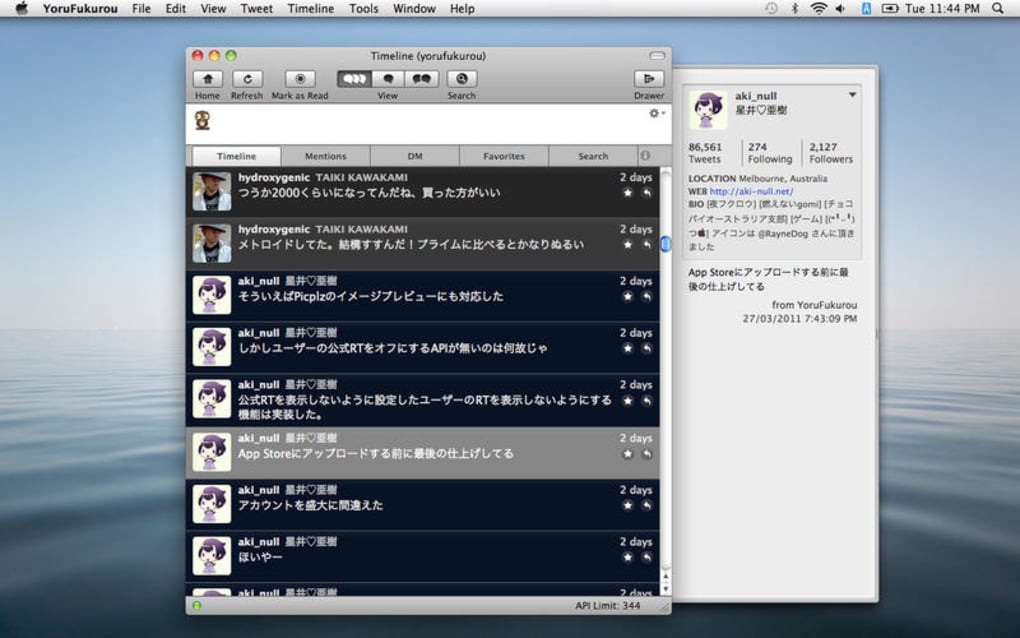
After installation, everyday usage feels intuitive: the left sidebar houses your recent conversations, the central feed displays community posts, and the right pane shows details for the selected chat or group. The interface respects macOS’s dark mode, automatically switching based on your system appearance settings. Whether you are a casual user checking messages over coffee or a professional managing multiple community channels, Night Owl’s streamlined workflow helps you stay organized and productive.
Compatibility & System Requirements
Night Owl is engineered exclusively for macOS, supporting the following versions:
- macOS 12 Monterey
- macOS 13 Ventura
- macOS 14 Sonoma (and future releases)
Minimum hardware specifications include a 64‑bit Intel or Apple Silicon processor, 4 GB of RAM, and at least 200 MB of free disk space for the application bundle and user data. While the app runs smoothly on older Intel‑based Macs, users with Apple M1, M2, or later chips will experience even faster launch times and reduced power consumption thanks to native ARM optimization.
Night Owl also integrates with macOS accessibility features. Users who rely on VoiceOver, Zoom, or Switch Control will find that all UI elements are properly labeled and navigable via keyboard shortcuts. The app respects the system’s security model: it runs inside a sandbox, requires no root privileges, and stores encrypted user data in the ~/Library/Application Support/NightOwl directory.
For users who operate in mixed‑environment offices, Night Owl offers a limited web client that can be accessed via modern browsers (Safari, Chrome, or Firefox). However, the full feature set—including Touch Bar support and native notifications—is only available through the macOS desktop client. If you are using a MacBook Air with limited storage, consider enabling the “Low‑Storage Mode” in Preferences, which automatically clears cached media older than 30 days while preserving recent conversations.
In summary, Night Owl’s compatibility strategy ensures that anyone with a reasonably recent Mac can enjoy a secure, ad‑free social networking experience without sacrificing performance or accessibility. The app’s lightweight footprint and native integration make it a natural fit for both personal and professional use cases.
Pros, Cons & Frequently Asked Questions
Pros
- Completely free with no hidden subscription fees.
- Native macOS design offers fast performance and smooth animations.
- End‑to‑end encryption protects private conversations.
- Bilingual interface (English & Japanese) broadens user base.
- Ad‑free environment keeps focus on genuine social interaction.
- Seamless integration with macOS features like Notification Center and Touch Bar.
- Offline drafting ensures you never miss a message.
Cons
- Currently limited to macOS; no official Windows or Linux client.
- Feature set is smaller compared to massive platforms like Facebook or Discord.
- No built‑in video‑calling functionality (relies on external services).
- Initial launch may trigger macOS security warning for unidentified developers.
- Community moderation tools are basic; large groups may need external oversight.
Frequently Asked Questions
Is Night Owl really free, or are there hidden costs?
Night Owl is completely free to download and use. There are no subscription tiers, in‑app purchases, or hidden fees. All core features, including private messaging, media sharing, and community groups, are available without charge.
How does Night Owl protect my privacy?
The app employs end‑to‑end encryption for all private messages and stores user data in an encrypted format within the macOS sandbox. Night Owl does not sell data to third parties and keeps tracking to a minimum, ensuring a privacy‑first experience.
Can I use Night Owl on a Windows PC?
At present Night Owl is only available for macOS. However, a web‑based client is under development, which will allow limited access from any modern browser, including Windows and Linux systems.
What should I do if macOS blocks the installer?
If you see a warning about an unidentified developer, open System Preferences → Security & Privacy → General, click “Open Anyway,” and confirm you trust the application. This is a standard macOS safeguard for apps not distributed through the App Store.
Does Night Owl support dark mode?
Yes. Night Owl automatically follows the system appearance setting, switching between light and dark themes to match macOS dark mode preferences.
Conclusion & Call to Action
Night Owl stands out as a purpose‑built social networking solution for Mac users who value privacy, performance, and a clean, ad‑free environment. Its bilingual support, native integration with macOS features, and free pricing model make it a compelling alternative to larger, more commercial platforms. While the lack of a Windows client and limited advanced moderation tools may be drawbacks for some, the core experience remains robust, secure, and enjoyable for everyday communication.
If you’re ready to experience a Mac‑centric social app that respects your data and runs efficiently, click the download button below, install Night Owl, and start connecting with friends and communities today. The setup takes only a few minutes, and you’ll instantly benefit from encrypted messaging, seamless media sharing, and a clutter‑free interface. Join the growing Night Owl community and discover a new way to stay social—free, secure, and designed just for macOS.







